Filming yourself
-
maria
- Posts: 225
- Joined: Wed Apr 15, 2009 5:00 am
Filming yourself
I was wondering if many members who are lucky enough to sink, film themselves? I find it adds to the thrill, specially when you get to look at your own masterpiece. What do members think? And if you do film, what sort of arrangements do you make to capture that sinking moment?
-
Boggy Man

- Posts: 2361
- Joined: Thu Apr 16, 2009 12:13 am
- Location: The Sunny Okanagan Valley, BC, Canada
Re: Filming yourself
I have made many videos of my sinks over the years:
https://www.quicksandfans.com/bb/viewtopic.php?f=19&t=2588
And for shooting the videos, I use a Gorillapod similar to the one in this photo:
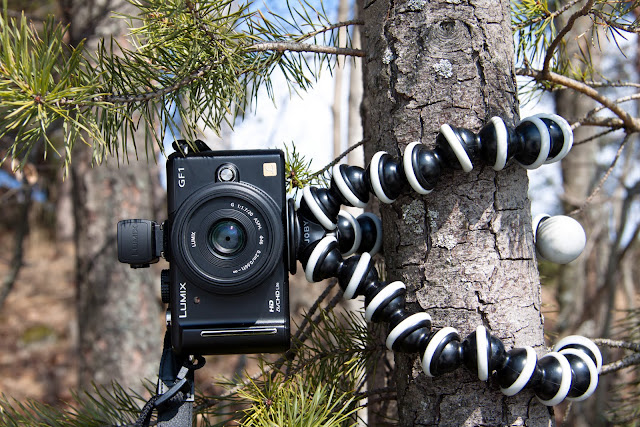
If there is nothing to mount the camera onto by the mud, I push a tall stick into the ground and then mount the camera/Gorillapod onto the stick. I properly frame the area I am going to sink into, click the record button, and let the fun begin!  After I am done, I exit the bog, clean my hands, stop the recording, turn the camera off, and then finish my cleanup or continue to play in the mud off-camera.
I find that watching my videos makes me yearn all the more for experiencing more enjoyable sinks into my sucking patch(es) of quagmire!
https://www.quicksandfans.com/bb/viewtopic.php?f=19&t=2588
And for shooting the videos, I use a Gorillapod similar to the one in this photo:
If there is nothing to mount the camera onto by the mud, I push a tall stick into the ground and then mount the camera/Gorillapod onto the stick.
I properly frame the area I am going to sink into, click the record button, and let the fun begin! After I am done, I exit the bog, clean my hands, stop the recording, turn the camera off, and then finish my cleanup or continue to play in the mud off-camera. I find that watching my videos makes me yearn all the more for experiencing more enjoyable sinks into my sucking patch(es) of quagmire!
I sink, therefore I WAM!!!!
(((ioi)))
-The Boggy Man
(((ioi)))
-The Boggy Man
-
lonesinker
- Posts: 148
- Joined: Tue Jul 06, 2010 7:44 pm
Re: Filming yourself
Wow that's pretty high tech..much better than setting a tri pod  It never occurred to me to film yourself til now..more stuff to carry,would need a bigger backpack
It never occurred to me to film yourself til now..more stuff to carry,would need a bigger backpack-
maria
- Posts: 225
- Joined: Wed Apr 15, 2009 5:00 am
Re: Filming yourself
I carry two tripod for two cameras and a spare battery for each - best to go prepared!
As I was sinking one time, I was causing the bog around to wobble as it tends to do in big areas, and as I was chest deep I watched the camera fall over in slow motion. It lens-planted and buried itself in the mud, but continued to film!
What sort of software do people use to play around with the movie afterwards?
As I was sinking one time, I was causing the bog around to wobble as it tends to do in big areas, and as I was chest deep I watched the camera fall over in slow motion. It lens-planted and buried itself in the mud, but continued to film!
What sort of software do people use to play around with the movie afterwards?
-
Fred588
- Producer
- Posts: 18634
- Joined: Sat Apr 11, 2009 3:37 pm
- Location: Central Arkansas (At Studio 588)
- Contact:
Re: Filming yourself
maria wrote:I carry two tripod for two cameras and a spare battery for each - best to go prepared!
As I was sinking one time, I was causing the bog around to wobble as it tends to do in big areas, and as I was chest deep I watched the camera fall over in slow motion. It lens-planted and buried itself in the mud, but continued to film!
What sort of software do people use to play around with the movie afterwards?
My opinion only but I think the answer to what software to use depends very much on what you are trying to do, or need to do. In my case I shoot with two, or more, cameras and need editing software (and hardware) that is powerful and fast. I use the Adobe Creative Suite (CS6) for editing, but I also use a very fast workstation with an enormous amount of external storage. Someone shooting with a single camera, editing a small(er) volume of material, and who can be satisfied with a not quite optimal final product ought to be able to use something MUCH less expensive.
Studio 588 currently offers more than 2200 different HD and QD quicksand videos and has supported production of well over 2400 video scenes and other projects by 20 different producers. Info may be found at:
http://studio588qs.com
http://quicksandland.com
http://psychicworldjungleland.com
http://studio588qs.com
http://quicksandland.com
http://psychicworldjungleland.com
-
maria
- Posts: 225
- Joined: Wed Apr 15, 2009 5:00 am
Re: Filming yourself
Fred588 wrote:maria wrote:I carry two tripod for two cameras and a spare battery for each - best to go prepared!
As I was sinking one time, I was causing the bog around to wobble as it tends to do in big areas, and as I was chest deep I watched the camera fall over in slow motion. It lens-planted and buried itself in the mud, but continued to film!
What sort of software do people use to play around with the movie afterwards?
My opinion only but I think the answer to what software to use depends very much on what you are trying to do, or need to do. In my case I shoot with two, or more, cameras and need editing software (and hardware) that is powerful and fast. I use the Adobe Creative Suite (CS6) for editing, but I also use a very fast workstation with an enormous amount of external storage. Someone shooting with a single camera, editing a small(er) volume of material, and who can be satisfied with a not quite optimal final product ought to be able to use something MUCH less expensive.
I'm a DIYer and don't have a budget really for editing software or a huge computer. I used to play around with Windows MovieMaker to cut bits out, but now that software isn't available. I've been using MPEG Streamclip because it is free, but struggle with cutting bits out because I don't understand it too well. I like it though because I can crop and zoom in. Any suggestions on other free software without the advertising stuff on it?
-
Fred588
- Producer
- Posts: 18634
- Joined: Sat Apr 11, 2009 3:37 pm
- Location: Central Arkansas (At Studio 588)
- Contact:
Re: Filming yourself
maria wrote:Fred588 wrote:maria wrote:I carry two tripod for two cameras and a spare battery for each - best to go prepared!
As I was sinking one time, I was causing the bog around to wobble as it tends to do in big areas, and as I was chest deep I watched the camera fall over in slow motion. It lens-planted and buried itself in the mud, but continued to film!
What sort of software do people use to play around with the movie afterwards?
My opinion only but I think the answer to what software to use depends very much on what you are trying to do, or need to do. In my case I shoot with two, or more, cameras and need editing software (and hardware) that is powerful and fast. I use the Adobe Creative Suite (CS6) for editing, but I also use a very fast workstation with an enormous amount of external storage. Someone shooting with a single camera, editing a small(er) volume of material, and who can be satisfied with a not quite optimal final product ought to be able to use something MUCH less expensive.
I'm a DIYer and don't have a budget really for editing software or a huge computer. I used to play around with Windows MovieMaker to cut bits out, but now that software isn't available. I've been using MPEG Streamclip because it is free, but struggle with cutting bits out because I don't understand it too well. I like it though because I can crop and zoom in. Any suggestions on other free software without the advertising stuff on it?
Sorry on the suggestios. I have used Premierre exclusively for thirteen years. I have found that for the most part things that are free are worth what you pay.
Studio 588 currently offers more than 2200 different HD and QD quicksand videos and has supported production of well over 2400 video scenes and other projects by 20 different producers. Info may be found at:
http://studio588qs.com
http://quicksandland.com
http://psychicworldjungleland.com
http://studio588qs.com
http://quicksandland.com
http://psychicworldjungleland.com
-
Nessie

- Producer
- Posts: 2634
- Joined: Tue Apr 14, 2009 8:30 pm
Re: Filming yourself
Boggy Man wrote:then mount the camera/Gorillapod onto the stick.
Ahh, yes, the Gorillapod! I had one of those too.
Nessie
-
Nessie
- Producer
- Posts: 2634
- Joined: Tue Apr 14, 2009 8:30 pm
Re: Filming yourself
maria wrote:Any suggestions on other free software without the advertising stuff on it?
I miss MovieMaker too.
Currently I am using Shotcut. It's free and open-source, compatible with Windows and Linux -- and it has no advertising connected with it at all.
I did get satisfactory results with it. That means that I was happy with the single project that I edited using it that was over 10 minutes long. I had one serious issue: It's buggy when your edits get complex. During final rendering, it errored and quit. I got around that by rendering each individual scene and then dumping the rendered scenes back on the timeline in chronological order (kind of like flattening a Photoshop file to get rid of all that extra data). And that worked.
I use it today in a totally non-professional way for random stuff.
I did have Vegas for awhile and it was wonderful. You can do almost anything with that. I would recommend it to the whole world -- except, one problem, it isn't free!
Nessie
-
mudxdresser

- Posts: 374
- Joined: Sat Apr 18, 2009 11:05 am
- Location: Austin, Texas
Re: Filming yourself
Various versions of MovieMaker are still around for free on sites that host old software. It can take some effort to get MovieMaker to run on newer operating systems so you'll probably find that a virtual machine using an older operating system is easier to get working. My MovieMaker and Vegas Video are still working just fine on a Windows 2000 virtual machine and I've been able to avoid having to learn a newer system. However, note also that even though you don't seem to be wanting to do advanced editing, you may still find that you want to use more modern features such as HD that are only available in newer video editors.
Return to “General Discussion”
Who is online
Users browsing this forum: No registered users and 1 guest